Origination stays connected
Companies, contacts, notes, tasks, email, communications, and pipeline context carry forward when a qualified opportunity becomes a borrower project.
§ Platform - CORE Workflow
CORE Workflow connects the relationship and pipeline to the formal borrower project. The selected loan program automatically deploys its configured collection package, while the confirmed deal structure determines which requirements belong to each borrower, guarantor, sponsor, affiliate, and asset. Each workstream keeps its own stages, releases, status, and history while evidence stays linked once and usable everywhere it is needed.
CRM and pipeline preserve the relationship before conversion. Inside the project, loan-program defaults deploy the operating package and DealEntity applicability adds the right requirements as the structure evolves. Independently managed workstreams coordinate portal release, review, and downstream underwriting without splitting the borrower into duplicate files.
CRM -> pipeline -> project -> program defaults + entity applicability -> one credit record§ Configuration-Driven Operations
Companies, contacts, notes, tasks, email, communications, and pipeline context carry forward when a qualified opportunity becomes a borrower project.
The project becomes the anchor for deal structure, programs, entities, team ownership, milestones, tasks, files, underwriting artifacts, and the credit memo.
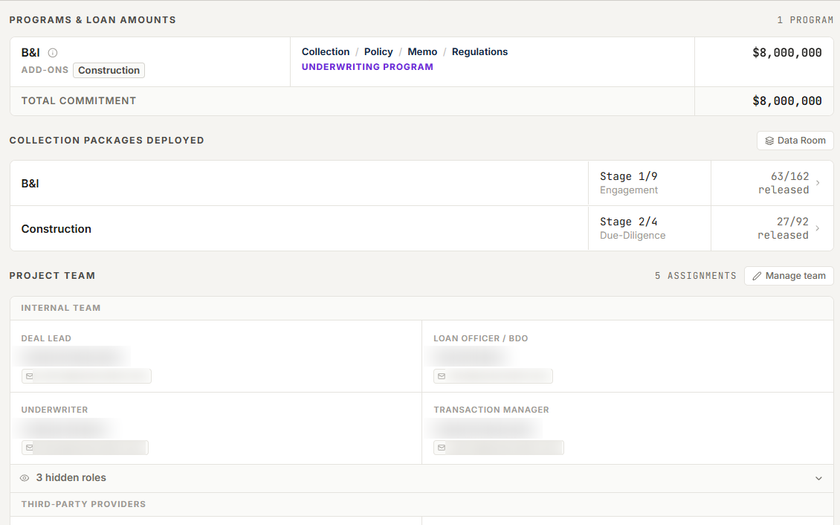
Selecting a loan program automatically deploys its active Base Package and configured workstreams. For supported underwriting programs, the same program context binds the applicable policy and memo defaults.
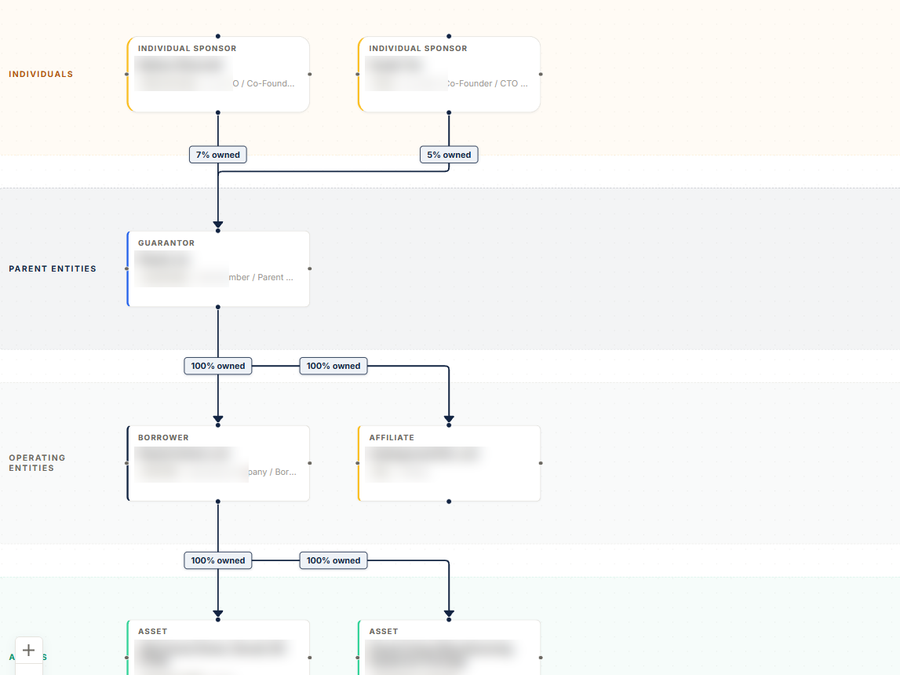
As a co-borrower, guarantor, sponsor, affiliate, or asset is confirmed, CORE automatically deploys the applicable requirements to that entity. Asset-type rules can narrow the package further.
Base and Add-on Package workstreams retain their own stages, assignments, portal visibility, and release history while shared files remain linked instead of copied.
Verified documents, structured forms, canonical entity ownership, and reviewed evidence flow into spreading, underwriting, credit memos, closing, and servicing from the same project record.
Product Proof
Three chapters show the operating model without publishing every screen: deliberate conversion, program-aware deployment, and entity-aware evidence control.
Relationship → opportunity → project
The relationship and pipeline preserve contacts, activity, ownership, terms, and next work until a user decides the opportunity is ready to become a formal credit project.
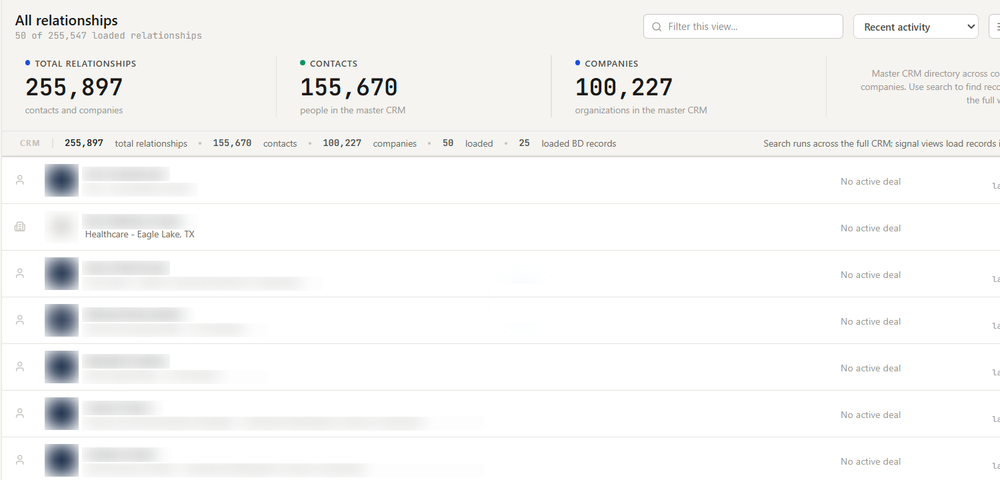
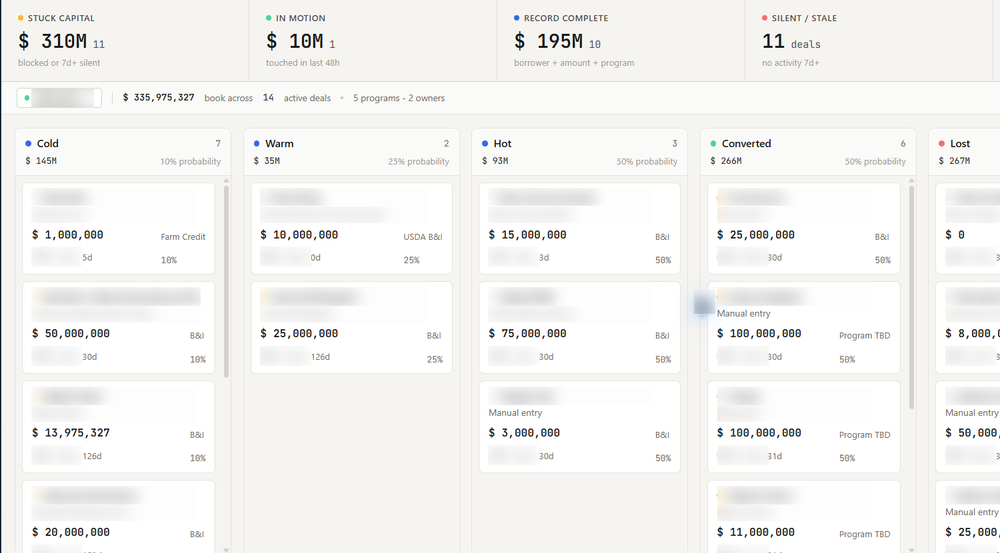
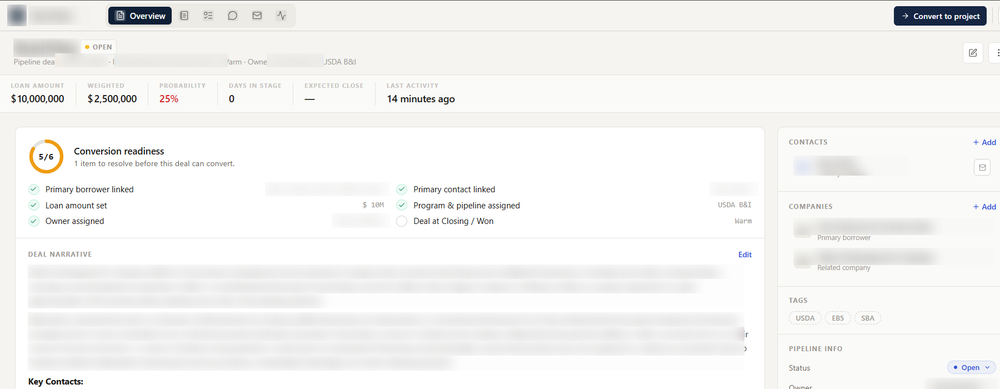
One project · program-aware deployment
Selecting a loan program automatically deploys its active Base Package and creates the configured workstreams. For supported underwriting programs, the same program context binds policy and memo defaults while each workstream keeps its own stage, release state, assignments, and history.
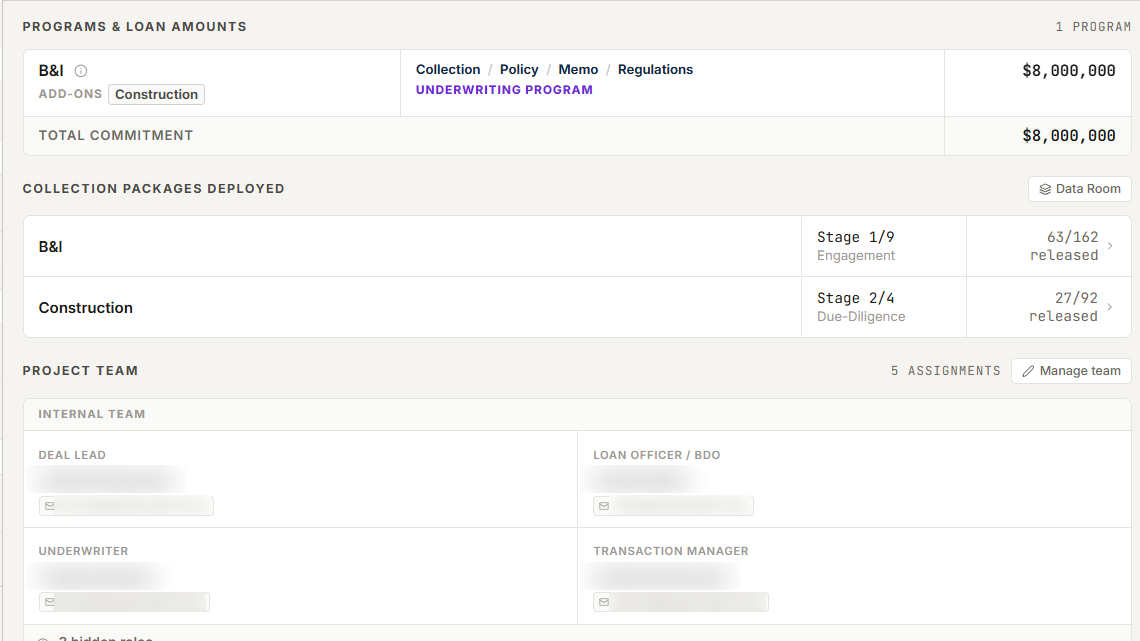
Controlled collection state
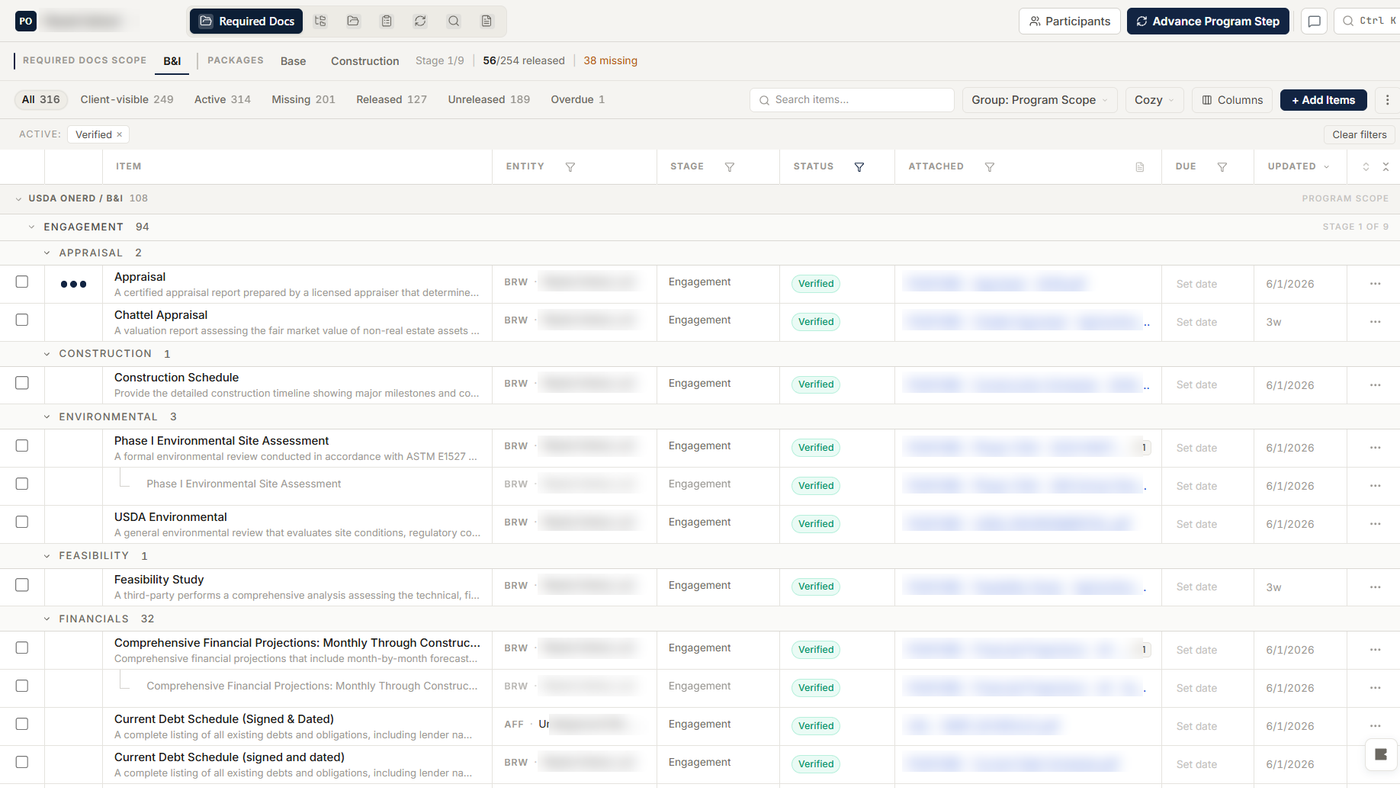
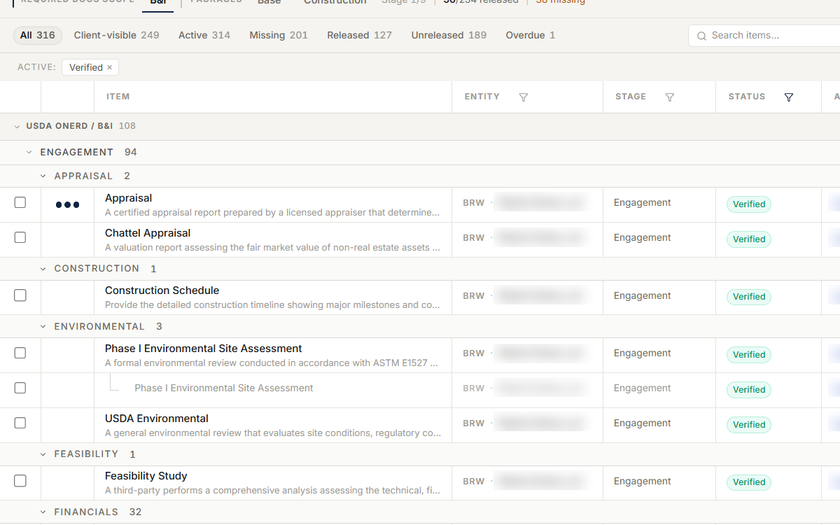
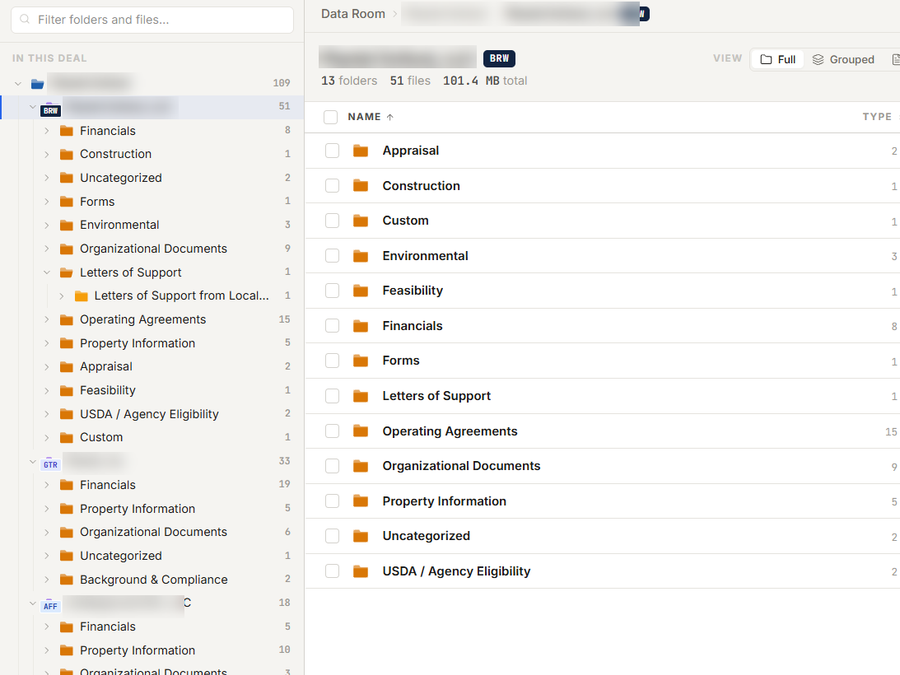
Requirements remain scoped to the right program, stage, and entity. When a co-borrower, guarantor, sponsor, affiliate, or asset is confirmed, CORE deploys the applicable items to that DealEntity while keeping portal visibility under separate control.
§ Fit
CORE Workflow is the operating layer for teams replacing relationship, pipeline, project, portal, checklist, and file-management sprawl.
CRM companies, contacts, relationship labels, custom fields, notes, tasks, and activity
Configurable deal pipelines with stages, ownership, amounts, probability, close dates, and opportunity health
Deal-to-project conversion with associated companies, contacts, tasks, notes, communications, and email carried forward for review
Project command center for structure, programs, team ownership, milestones, tasks, and artifacts
Loan-program defaults that deploy the active Base Package and, for configured underwriting programs, bind policy and memo defaults
Entity-aware deployment for borrower, guarantor, sponsor, affiliate, asset, Loan-Level, and Internal requirements
Multiple Base and Add-on Package workstreams under one project, each with independent stages and releases
Portal, project email, analyst upload, data-room, structured-form, and internal-review paths
Shared requirements and evidence across workflows without duplicating the underlying file
AI-assisted classification and requirement matching with analyst review, provenance, and audit history
§ Path
Origination manages the relationship, activity, terms, owner, next work, and communications until a user decides the opportunity is ready for formal credit work.
Conversion establishes one project record and carries the relationship history forward while parties are staged for proper borrower, guarantor, sponsor, affiliate, or other roles.
The selected loan program resolves its active Base Package, configured workstreams, and entity applicability. Supported underwriting programs also bind the applicable policy and memo defaults.
Files and forms arrive through the portal, project email, analyst upload, or data room; requirements show missing, released, attached, received, review, rework, verified, or excluded state.
Shared evidence remains linked to its canonical file and entity while each participating workflow keeps the status and review context it needs.
Confirmed entities, organized documents, structured forms, and reviewed evidence feed spreading, underwriting, credit memos, closing, and servicing without rebuilding the file.
§ In Depth
CORE's native CRM and pipeline matter because the relationship, people, activity, tasks, communications, and opportunity terms survive the handoff into formal credit work. A qualified opportunity becomes the starting context for the project instead of another record the credit team has to recreate.
That continuity is useful, but it is only the beginning of CORE Workflow. The real operating model starts when the project has to coordinate multiple programs, parties, packages, stages, evidence paths, and reviewers at the same time.
CORE does not start every project with a blank checklist. The selected loan program resolves its active Base Package and configured workstreams; for supported underwriting programs, the same program context also binds the applicable underwriting policy and memo defaults.
Deployment then follows the confirmed DealEntity structure. Add a co-borrower, guarantor, sponsor, affiliate, or asset and CORE automatically deploys the requirements configured for that role or asset type. The project gains the right work incrementally without forcing the analyst to rebuild the package by hand, while client visibility and release timing remain separately controlled.
A complex borrower project rarely follows one flat checklist. The primary loan program may have its own base package and nine-stage release plan while a construction package, specialty diligence package, or internal review path moves on a different schedule.
CORE keeps those workflows independent inside the same project. Each retains its program scope, entity assignments, stages, portal release state, progress, ownership, and history, while the project maintains one connected structure and audit trail.
The same appraisal, financial statement, organizational document, or project artifact may satisfy more than one program workflow. CORE can share the requirement across workflows while preserving workflow-specific review state, so the underlying file remains linked once instead of being copied into competing folders and checklists.
A single requirement can also accept multiple files when the evidence naturally arrives as a set. The system models the evidence relationship directly rather than asking an analyst to manufacture duplicate requirements or empty placeholders.
Required documents are program-aware, entity-aware, and stage-aware. Borrower, guarantor, sponsor, affiliate, asset, Loan-Level, and Internal work deploys as the matching project structure is confirmed, then can be released when appropriate, hidden from the portal until ready, routed to the right requirement, and moved through received, review, rework, verified, or excluded states.
The result is more than an organized data room. It is reviewed project evidence with ownership, status, release history, forms, signatures, and provenance that can feed spreading, policy and risk analysis, credit memo work, closing, and servicing.
§ Next Step
See one relationship become a project, the loan program deploy its operating package, the deal structure add entity-specific requirements, and reviewed evidence continue into underwriting in one focused walkthrough.